Software review
Surfshark Antivirus: what it actually includes, and who it is for
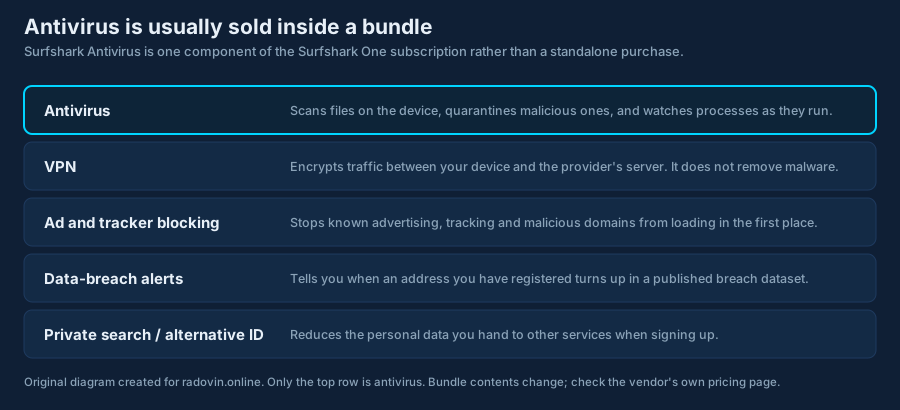
Surfshark does not sell an antivirus product on its own. It sells a security subscription that contains an antivirus component alongside several other tools. That single fact changes how you should compare it with the products it is usually listed against — and it is the first thing most write-ups get wrong.
This article sets out what the Surfshark antivirus component is, what we were able to verify about it from primary sources, and — just as importantly — what we were not able to verify and therefore do not claim. It also explains how consumer antivirus software works in general, so that you can judge this product, or any other, without relying on anybody’s summary.
- Not standalone. At the time of writing the antivirus is sold only as part of the Surfshark One and Surfshark One+ subscriptions.
- Windows 10 and later, macOS 11 Big Sur and later, Android 10 and later. Surfshark states it is not compatible with Windows on ARM, or with Android devices that are not 64-bit. There is no file-scanning antivirus on iOS — from Surfshark or from anyone else.
- Five devices, not unlimited. Surfshark’s antivirus page states support for up to 5 devices. The “unlimited devices” figure you may have seen applies to Surfshark’s VPN, not to the antivirus.
- It is AV-TEST certified. In AV-TEST’s June 2026 Windows 11 test, Surfshark Antivirus 6.9 and 6.11 scored 6.0/6 protection, 4.5/6 performance, 6.0/6 usability. The full result history and the caveats are in section 6.
- No prices here. Subscription pricing changes frequently and varies by region and promotion. The vendor’s own checkout is the only accurate source.
- A refund window is advertised. Surfshark advertises a 30-day money-back guarantee. Read the current terms before paying — conditions and exclusions can change.
1. What Surfshark Antivirus actually is
Surfshark began as a VPN provider and later added other tools. The antivirus is one of those tools. According to Surfshark’s own product and pricing pages at the time of writing, it is delivered inside the Surfshark One bundle (and the larger One+ tier) rather than sold as a separate licence. You therefore cannot buy “Surfshark Antivirus” the way you buy a traditional standalone antivirus licence.
Surfshark’s own FAQ answers the question directly: asked whether the antivirus can be bought on its own, the page replies “Currently — no. Surfshark Antivirus only comes in the Surfshark One bundle with a VPN, Alert, and Search.” Surfshark One also includes Alternative ID.
That matters for comparison. A bundle price covers a VPN, ad and tracker blocking, breach alerts and a private search tool as well as the scanner. Comparing that total against the price of a standalone antivirus licence from another vendor is not a like-for-like comparison in either direction: you may be paying for tools you will not use, or getting tools you would otherwise buy separately.
2. Why antivirus still matters — and what it cannot do
Modern operating systems ship with real protection built in. Microsoft Defender is included with Windows and is a genuine antivirus product, not a placeholder; macOS has XProtect and Gatekeeper; Android has Play Protect. Anyone telling you that an unprotected Windows machine has no defence is selling something.
The case for a third-party product is narrower and more honest than the usual pitch: additional detection layers, features the built-in tool does not offer, cross-platform management from one subscription, and vendor support when something goes wrong. Whether that is worth paying for depends on your situation, not on fear.
What has genuinely changed is the shape of the threat. European and international reporting — the ENISA Threat Landscape series and Europol’s IOCTA reports are the accessible primary sources — consistently describes a professionalised criminal economy: ransomware sold as a service, credential theft feeding account takeover, and social engineering doing much of the work that technical exploits used to do. We link those reports rather than paraphrasing numbers from them, because the figures change with each edition and a statistic quoted without its year and method is worse than no statistic at all.
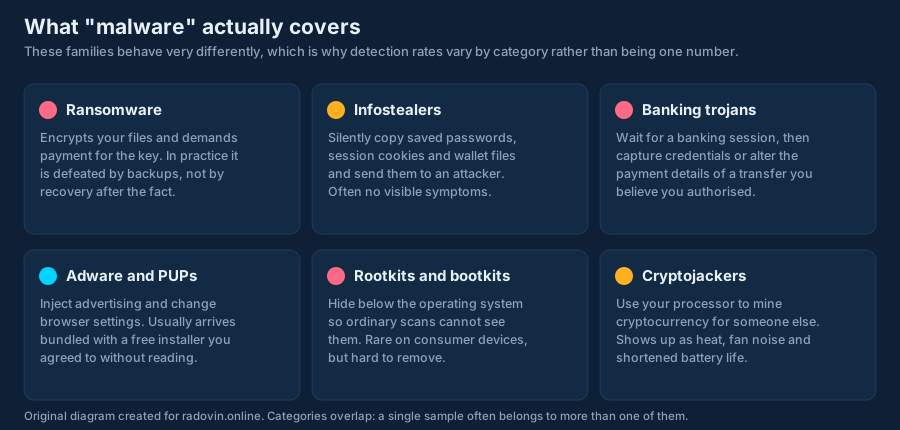
No scanner can guarantee protection. It cannot recover files already encrypted by ransomware — only a backup does that. It cannot stop you entering your password into a convincing fake login page. It cannot protect an account whose password leaked in someone else’s breach. Any product or page promising complete safety, guaranteed removal or 100% detection is overstating what the technology does.
3. How a real-time scanner reaches a verdict
Consumer antivirus products differ in the details, but nearly all of them combine the same three detection approaches. Understanding them tells you why detection rates are never perfect and why false alarms happen.
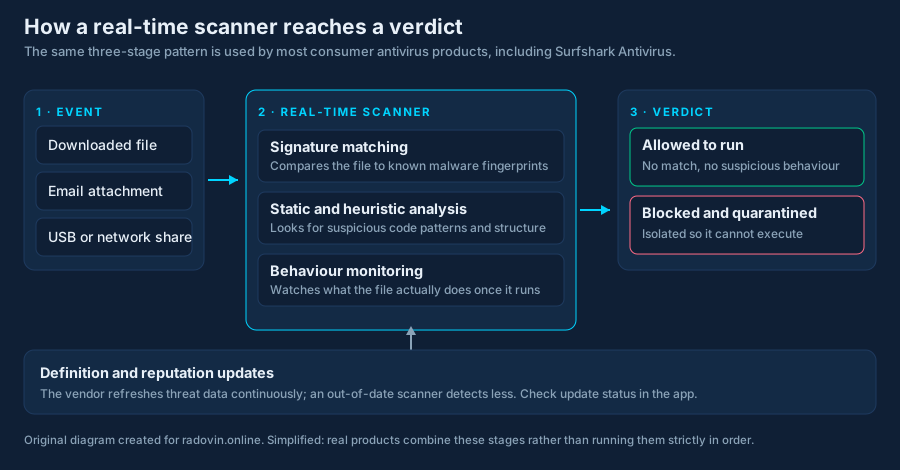
Signature matching
The file is hashed or fingerprinted and compared against a database of known malicious samples. This is cheap, fast and essentially never wrong — and useless against anything the vendor has not seen yet. It is why definition updates matter and why a scanner that has not updated in weeks is much weaker than one that has.
Static and heuristic analysis
The file’s structure and code are examined for patterns associated with malicious software: packing and obfuscation, suspicious imports, code that rewrites itself. This generalises to unseen samples. It is also where false positives come from: legitimate software sometimes uses the same techniques, which is why small developers’ tools occasionally get flagged.
Behaviour monitoring
The program is watched as it runs. Rapid encryption of many files in sequence, tampering with shadow copies, injecting into another process, or contacting known command-and-control infrastructure will trip the monitor even if the file itself was unknown. This is the layer most likely to catch a genuinely new threat, and the layer most likely to need a judgement call.
In marketing copy, “zero-day” is often used loosely to mean “new malware”. In security work it properly means a vulnerability the vendor has had zero days to fix. Most new malware is not a zero-day; it is new packaging of a known technique. Behaviour monitoring helps with both, but the two are not the same thing.
4. Platform coverage, and why iOS is different
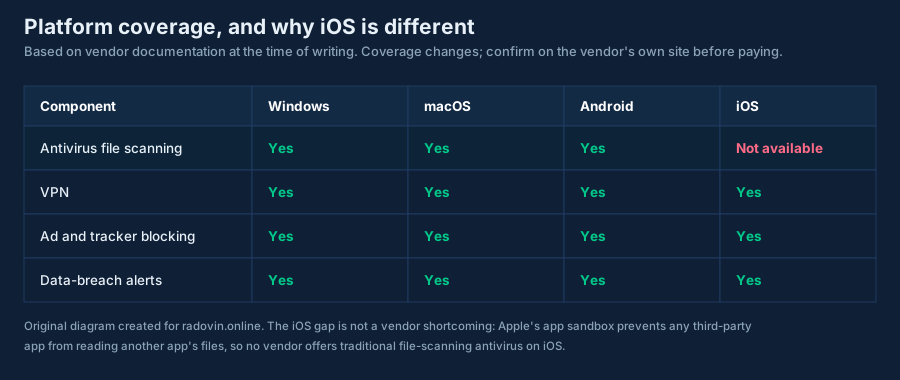
Surfshark’s documentation lists antivirus support for Windows 10 and later, macOS 11 (Big Sur) and later and Android 10 and later, and states two exclusions worth checking before you pay: it is not compatible with Windows on ARM, nor with Android devices on anything other than 64-bit architecture. There is no antivirus component for iOS or iPadOS. This is not a shortcoming of this vendor: Apple’s application sandbox prevents any third-party app from reading another app’s files, so traditional file-scanning antivirus is technically impossible on iOS. Products marketed as “iPhone antivirus” are in practice web filters, VPNs or breach-alert tools.
5. The feature list, and how confident we are in each item
The table below separates what we could establish from primary sources from what we could not. We would rather publish a short verified list than a long unverified one.
| Item | What it means | Basis |
|---|---|---|
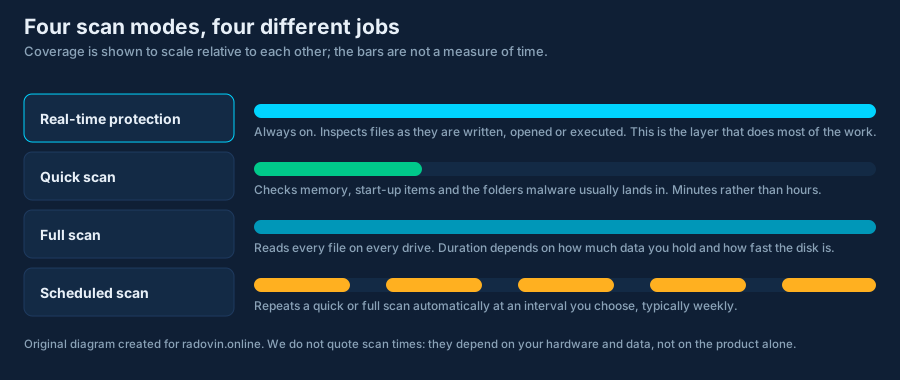
| Real-time protection | Files are inspected as they are written, opened or executed. | Vendor documentation. We did not benchmark it. |
| Manual and scheduled scans | Quick and full scans on demand or on a timer you set. | Vendor documentation. |
| Cloud-assisted definition updates | New threat data arrives without reinstalling the app. | Vendor documentation. |
| Webcam protection | Alerts you when an application opens the camera. | Listed on the vendor’s antivirus page. |
| Cloud Protect | Threat database refreshed without a client update. | Vendor states the database is updated every three hours. Not independently verified. |
| System requirements | Windows 10+, macOS 11+, Android 10+ (64-bit); no Windows ARM. | Vendor’s stated compatibility. |
| Sold inside Surfshark One | Not available as a standalone antivirus licence. | Vendor pricing page. |
| Device allowance | Up to 5 devices for the antivirus. | Stated on the vendor’s antivirus page. Note that Surfshark’s well-known “unlimited devices” claim relates to the VPN, not to this component. |
| Detection (protection score) | How much malware it catches under test conditions. | 6.0 out of 6 — AV-TEST, June 2026, Windows 11, versions 6.9 and 6.11. See section 6. |
| Performance impact | How much it slows common tasks down. | 4.5 out of 6 — same AV-TEST run. This is its weakest sub-score. We ran no benchmark of our own. |
| False positives (usability) | How often it flags clean software. | 6.0 out of 6 — same AV-TEST run. |
| Price | What you pay, now and on renewal. | Changes frequently. Only the vendor’s checkout is accurate. |
6. Independent lab testing: what the results actually say
The two reference points for consumer antivirus detection are AV-TEST (Magdeburg) and AV-Comparatives (Innsbruck). Both publish their methodology alongside their results and test against large live sample sets under controlled conditions. That is what makes their numbers comparable, and a vendor’s own figures, or a reviewer’s handful of samples, essentially meaningless.
Surfshark Antivirus is submitted to AV-TEST, and the results are published on AV-TEST’s own site, not only in the vendor’s marketing. Each category is scored out of 6, for a maximum of 18.
| Test | Version | Platform | Protection | Performance | Usability | Total |
|---|---|---|---|---|---|---|
| June 2026 | 6.9 & 6.11 | Windows 11 | 6.0 | 4.5 | 6.0 | 16.5 / 18 |
| June 2025 | 5.15 & 5.16 | Windows 10 | 6.0 | 5.5 | 5.5 | 17.0 / 18 |
| June 2024 | 5.7 | Windows 10 | 6.0 | 5.5 | 6.0 | 17.5 / 18 |
| December 2022 | 4.4 & 4.5 | Windows 10 | 4.5 | 4.5 | 6.0 | 15.0 / 18 |
How to read that table
- Protection has been at the maximum 6.0 in the three most recent tests. This is the category that measures whether malware is actually stopped, and it is the number that matters most. It is a good result, and an improvement on the 4.5 recorded in December 2022.
- Performance is the weakest column, and it went down. 4.5 out of 6 in June 2026, from 5.5 the year before. Performance measures the slowdown the product imposes on everyday tasks such as launching applications, copying files and installing software. If your machine is old or already slow, this is the sub-score to weigh.
- Usability measures false alarms — clean software wrongly flagged. 6.0 out of 6 means very few, which is what you want.
- AV-TEST awards its seal from 10 of 18 points. At 16.5 the product is comfortably certified, though certification is a threshold, not a ranking.
- They are Windows results. We found no equivalent AV-TEST result for the macOS or Android builds. Do not read a Windows protection score across to another platform.
- We found no current AV-Comparatives result for this product. A second lab would be a stronger basis than one.
- They describe a specific version at a specific time. The June 2026 figures apply to versions 6.9 and 6.11. Check AV-TEST’s page yourself for anything newer — it is free to read and it will be more current than this article.
7. Privacy, and the company behind the product
Surfshark is operated by Surfshark B.V., a company registered in the Netherlands. In February 2022 Surfshark and Nord Security announced a merger of the two businesses; both have continued to operate as separate brands with separate products and infrastructure.
Surfshark has published independent assurance reports relating to the no-logs claim made for its VPN service. Those engagements concern VPN logging practice. They are not an assessment of the antivirus engine’s detection quality, and should not be presented as one.
A point worth understanding about any antivirus: a cloud-assisted scanner necessarily sends some data to the vendor — typically file hashes, and in some configurations suspicious samples themselves — because that is how cloud reputation lookup works. What matters is what the vendor says it does with that data and whether you can switch sample submission off. Read the vendor’s own privacy policy for the antivirus specifically, not the VPN policy, before deciding.
8. Price, billing and refunds
We publish no prices. Subscription pricing for this category changes constantly, differs by country, and is almost always promotional for the first term, with renewal at a higher rate. Any figure we printed would be wrong within weeks, and a wrong price is a misleading claim.
Three things worth checking on the vendor’s own checkout before you pay:
- The renewal price, not the introductory price. Multi-year introductory offers usually renew at the standard annual rate.
- Which tier contains the antivirus. The VPN-only plan does not.
- The refund window and its conditions. Surfshark advertises a 30-day money-back guarantee; the current terms of service are the authoritative statement of what that covers.
Under EU consumer law you also have a statutory 14-day right of withdrawal for most distance contracts, separate from any commercial guarantee — though for digital services that begin immediately you may be asked to waive it at checkout. This is a general statement of the rules and not legal advice.
9. Where antivirus sits among everything else
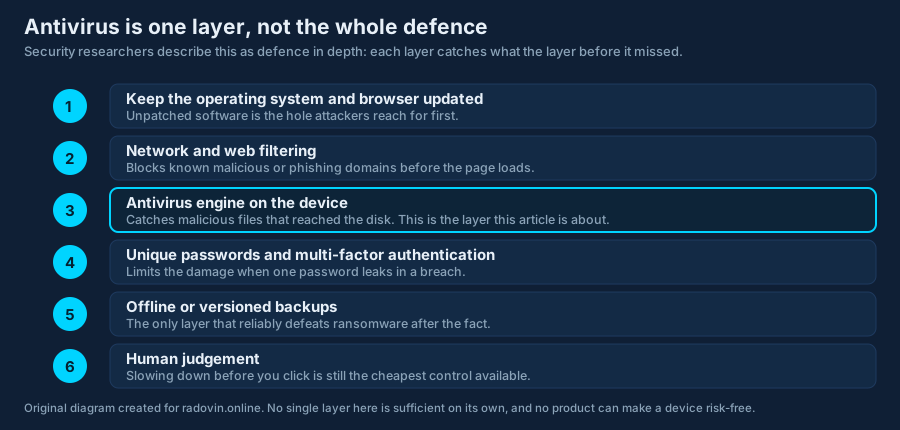
If you take one thing from this article, take this: antivirus is a layer, not a solution. Several of the measures below cost nothing and reduce risk more than any purchase will.
10. Who it suits — and who should look elsewhere
It may suit you if
- You already want a VPN and would otherwise buy one separately. The bundle economics only work if you will use more than one component.
- You are covering several devices across Windows, macOS and Android from one account.
- You prefer a single subscription and one app to manage rather than several vendors.
Look elsewhere if
- You want a documented detection score before buying. Choose a product with current AV-TEST or AV-Comparatives results and read them.
- You only need antivirus. Paying for a bundle to use one component is poor value, and Microsoft Defender is already included with Windows.
- The device you are worried about is an iPhone or iPad. No file-scanning antivirus exists for that platform.
- You need business or enterprise features — central management, endpoint detection and response, incident support. This is a consumer product.
11. How to decide for yourself, in five minutes
- Write down which devices you are actually protecting, and their operating systems.
- Check whether the built-in protection on those devices is switched on and updating. Often it is not.
- Look up the shortlisted products on AV-TEST and AV-Comparatives. Read the method, not just the score.
- Compare the renewal price of each, per year, for the number of devices you actually have.
- Before paying, confirm the refund window and whether the plan you are buying contains the component you want.
Our eight-point security checklist covers the free measures worth doing first, and our guide to how antivirus software works goes further into detection than this review does.
12. What we corrected in this article
An earlier version of this page was written as a first-person “reader story” and contained claims that could not be substantiated. It was rewritten in full. The following were removed or replaced:
- A claimed personal test result of “100% of known malware samples” caught, and a “zero-day payload other products missed”. Removed — no such test was conducted.
- A stated full-system scan time of about 12 minutes. Removed — scan duration is hardware- and data-dependent and was not measured.
- An anecdote about a phishing page being blocked during a personal test, and a support reply “within two minutes”. Removed — both were unverifiable narrative.
- “The average person interacts with hundreds of malicious payloads every month.” Removed — this figure has no source. Replaced with links to ENISA and Europol primary reporting.
- “Does not sell your browsing history.” Replaced with a pointer to the vendor’s own privacy policy, which is the only authoritative statement of its practice.
- The implication that this is a standalone antivirus product. Corrected: it is a component of the Surfshark One bundle.
- Claims that it is “priced significantly less than premium brands” and comparisons with two unnamed competitors. Removed — unverifiable and no longer accurate as soon as prices move.
- “Reader Stories” branding and “reader-submitted” framing. Removed — the page is an editorial review with a named author, not reader content.
- Battery-life and performance assertions. Removed — not measured.
Corrections made to this rewritten version, on the same day, after checking primary sources:
- A draft of this page stated that Surfshark advertises unlimited devices on one account. Corrected: Surfshark’s antivirus page states support for up to 5 devices. The unlimited-devices figure relates to the VPN, not the antivirus.
- A draft of this page stated that no current AV-TEST or AV-Comparatives certification could be found. Corrected: AV-TEST publishes results for this product, most recently June 2026, and they are now quoted with their source in section 6. The AV-Comparatives half of that statement stands — we found no current result there.
13. Sources
- Surfshark — official product, pricing, terms and privacy pages: surfshark.com/antivirus
- AV-TEST Institute, Surfshark result history — av-test.org/en/antivirus/home-windows/manufacturer/surfshark/
- AV-TEST Institute, current Windows tests — av-test.org
- AV-Comparatives — av-comparatives.org
- ENISA Threat Landscape — enisa.europa.eu
- Europol IOCTA — europol.europa.eu
- Apple App Store Review Guidelines, on the iOS sandbox — developer.apple.com
- Microsoft Defender documentation — learn.microsoft.com
The advertiser’s own published information prevails. Where anything on this page differs from Surfshark’s current product pages, terms of service, privacy policy or checkout, the advertiser’s own information is correct and this page is out of date. Software changes between releases and this review is a snapshot dated 21 September 2026. If you find an error, tell us and we will correct it — see our corrections procedure.
Every diagram on this page was drawn specifically for radovin.online as an original SVG file. None is a product screenshot, a vendor asset or a stock image, and none reproduces any third party’s branding. Each carries a text description for screen readers.
Trademark notice. Surfshark and the Surfshark logo are trademarks of their respective owner. BRUGAL s.r.o., which operates radovin.online, is not affiliated with, endorsed by, sponsored by or otherwise connected to Surfshark B.V., Nord Security, or any other company named on this site. Product names are used for identification and commentary only.