How antivirus software works
Once you know what the three detection layers actually do, most antivirus marketing becomes easy to read — including the parts that are overstated.
The basic loop
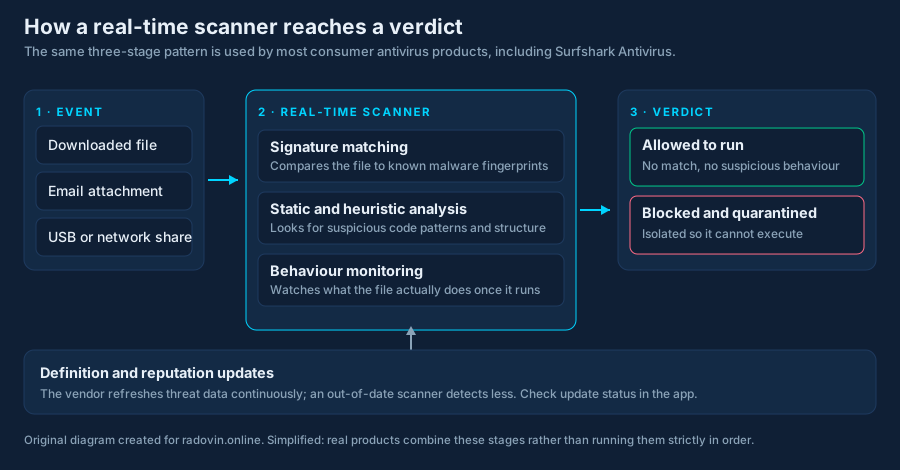
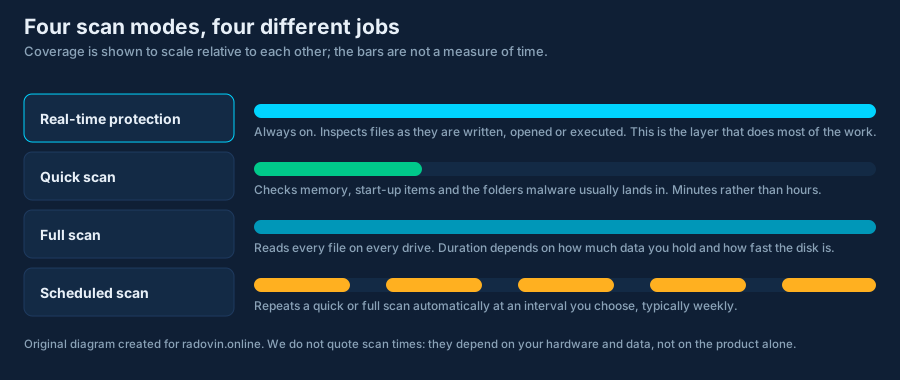
A real-time scanner hooks into the operating system so that it is notified whenever a file is created, opened, modified or executed. At that moment it has a fraction of a second to decide whether to let the operation proceed. Everything else — scheduled scans, the tray icon, the dashboard — is supporting cast.
Layer one: signatures
A signature is a fingerprint of a known malicious file — a hash, or a pattern of bytes distinctive enough to identify a family. Matching is fast and produces almost no false alarms.
Its weakness is structural: it can only recognise what the vendor has already seen and catalogued. Attackers defeat signature matching cheaply, by recompiling or repacking a sample so that its fingerprint changes while its behaviour does not. This is why a product’s update frequency matters more than its signature count, and why “millions of signatures” is a meaningless selling point.
Layer two: static and heuristic analysis
Here the file is examined without running it. The scanner looks at structure and content: is the executable packed or obfuscated? Does it import functions typically used to inject code into another process? Does it contain a section that rewrites itself at load time? Does a document contain a macro that reaches out to the network?
This generalises to samples never seen before. The cost is false positives: legitimate software sometimes does exactly these things. Installers pack themselves; debugging tools inject into processes; small developers ship unsigned binaries. When your own harmless utility gets quarantined, this is usually the layer responsible.
Do not simply switch protection off. Verify the file independently — check the publisher’s signature and the download source — then add a narrow exclusion for that specific file, and report it to the vendor. Blanket folder exclusions are a common way people end up unprotected without realising.
Layer three: behaviour monitoring
The third layer judges a program by what it does. Encrypting a large number of files in rapid succession, deleting volume shadow copies, writing itself into an autostart location, injecting into a system process, or contacting infrastructure known to be used for command and control — any of these can trip the monitor even when the file itself was completely unknown.
This is the layer that can stop something genuinely new, and it is also where products differ most. It necessarily involves judgement, which means both misses and false alarms.
Scan modes, and which one matters
Cloud lookup, and what it sends
Most modern products consult a cloud reputation service: the client sends a hash, or metadata, and asks whether this file is known. This makes detection much faster to update than shipping definition files, and it means something about your files leaves your machine. Some products additionally offer to upload suspicious samples themselves.
That is a reasonable trade, but it is a trade. If it matters to you, find the sample-submission setting and read the vendor’s privacy policy for the antivirus specifically — which is frequently a different document from the one covering their other products.
Why running two antivirus products is worse, not better
Two real-time engines both hook the same file operations and both try to quarantine the same file. They can flag each other’s quarantine folders, deadlock over a file lock, and cause serious slowdowns or instability. On Windows, Microsoft Defender steps aside automatically when it detects another registered antivirus, which is the correct behaviour — but deliberately forcing two to run together leaves you less protected, not more.
What detection rates actually mean
When AV-TEST or AV-Comparatives publishes a protection score, it comes from exposing the product to a defined sample set under a documented method during a stated period. That is what makes the number comparable. Percentages quoted without a lab, a date and a method are marketing, whoever prints them.
The limits, stated plainly
- No scanner catches everything, and every vendor knows it.
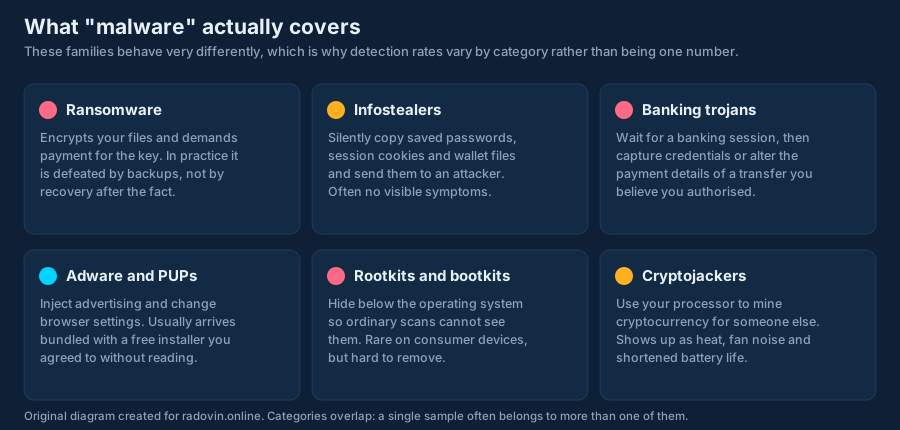
- Antivirus cannot decrypt files that ransomware has already encrypted. Backups do that.
- It cannot stop you typing your password into a convincing fake page.
- It cannot protect an account whose credentials leaked somewhere else entirely.
- It cannot repair a machine where an attacker already has administrative control; that machine needs rebuilding.
Which is why the checklist matters at least as much as the product, and why our review places antivirus in context rather than at the centre.