Cookie policy
Effective 21 September 2026
This website stores nothing on your device and reads nothing from it. No cookies, no local storage, no session storage, no IndexedDB, no cache storage, no fingerprinting. There is nothing to consent to, which is why you are not being asked.
1. Why there is no cookie banner
Article 5(3) of the ePrivacy Directive (2002/58/EC, as amended by 2009/136/EC), implemented in the Czech Republic in Section 89 of Act No. 127/2005 Coll. on electronic communications, requires consent before storing information on, or gaining access to information already stored on, a user’s terminal equipment.
We do neither. The obligation is therefore not triggered, and a consent banner would ask you to permit something that is not happening. We took the view that removing the tracking is a better answer than adding a dialog box in front of it.
2. What this means concretely
| Mechanism | What it is normally used for | Used here? |
|---|---|---|
| HTTP cookies | Sessions, preferences, advertising and analytics identifiers | No — the server sends no Set-Cookie header |
| localStorage | Persistent key-value data kept between visits | No |
| sessionStorage | Key-value data kept for one browser tab | No |
| IndexedDB | Larger structured client-side databases | No |
| Cache Storage / service worker | Offline caching and background scripts | No — no service worker is registered |
| Web beacons and tracking pixels | Counting views and conversions | No |
| Device fingerprinting | Identifying a browser without storing anything | No — we read no canvas, font list or device metric |
| Third-party resources | Fonts, analytics, CDN files, embeds — each one a request to another company | No — every file is served from radovin.online |
3. How to verify this yourself
Please do not take our word for it. It takes about a minute.
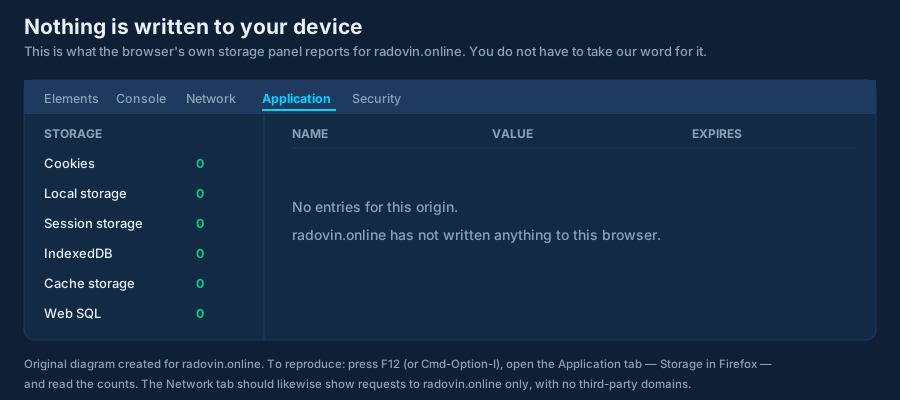
In Chrome, Edge, Brave or Opera
- Press
F12, orCmd+Option+Ion a Mac. - Open the Application tab.
- In the left sidebar under Storage, click Cookies, then
Local storage, then Session storage, then IndexedDB.
Each should be empty for
https://radovin.online.
In Firefox
- Press
F12and open the Storage tab. - Check Cookies, Local Storage, Session Storage, Indexed DB and Cache Storage.
In Safari
- Enable the Develop menu in Settings → Advanced.
- Open the Web Inspector and choose the Storage tab.
Check the network as well
Open the Network tab and reload the page. Every request should be to
radovin.online. There should be no request to a font service, a CDN, an analytics endpoint or
any other domain. You can also look at the response headers for the page itself: there is no
Set-Cookie header.
Read the source
The site loads exactly one script, /js/cta.js. It is short, unminified and
commented, and you can read it in your browser. It reads advertising parameters from the address bar, copies
them onto partner links, and re-applies the required rel attributes. It contains no call to
document.cookie, localStorage, sessionStorage, indexedDB
or fetch.
4. Server logs are not cookies
Our web server does keep short-lived access logs, which include IP addresses. That is a separate matter from storing something on your device, and it is covered in section 2.1 of our privacy policy. We mention it here so that “we store nothing” is not read as a claim that no data whatsoever exists anywhere.
5. When you follow a partner link
Partner links lead to other companies’ websites. Those sites very probably do use cookies, including for affiliate attribution, and they will ask for your consent under their own rules. Our zero-storage promise covers radovin.online only. It cannot extend to a site we do not operate.
6. If this ever changes
If we ever introduce anything that stores or reads data on your device, we will implement a compliant consent mechanism before doing so, and this page will say what changed and when. Until the date at the top of this page changes, the statement above stands.